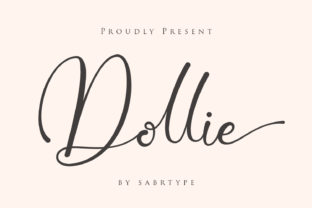
Dollie: The Elegant Script Font for Elevated Branding and Design
The visual identity of a project is its first impression, a silent ambassador that conveys style, intent, and quality before a single word is read. For professionals and creators crafting logos, wedding invitations, social media assets, or any branding element, selecting the right typography is a critical step in the design process. Dollie enters this workflow as a specialized tool: an elegant script font designed to deliver a specific aesthetic of sophistication and grace.
Understanding where a resource like the Dollie font fits requires viewing design not as a single action but as a sequence of decisions and implementations. It is an asset acquired during the preparation phase, a choice that influences all subsequent creative execution. Its integration affects consistency, sets a tonal foundation, and interacts directly with other visual elements like color palettes, imagery, and layout structures.
Integrating Dollie into Your Creative Planning Process
The most effective use of Dollie begins before the design software is even opened. It starts with assessment and alignment. When planning a brand identity for a boutique business, a luxury event, or a personal blog aiming for a refined audience, the project's core values and desired emotional response must be defined. Is the goal to evoke tradition, romance, artistry, or premium quality? If these keywords align with the project brief, then Dollie becomes a candidate for the typography shortlist.
This font is not a universal solution; it is a strategic one. Its elegant, flowing characters work in harmony with minimalist layouts and high-quality photography, but may clash with overly technical or rugged complementary elements. Therefore, its adoption should coincide with decisions about other assets. Selecting Dollie often means committing to a cohesive visual direction where other components support its delicate demeanor. This upfront compatibility check prevents disjointed designs and streamlines the later stages of production.
Practical Applications and Workflow Examples
Once selected, Dollie moves from a planning asset to an active tool in the execution phase. Its application spans numerous touchpoints in a project’s lifecycle.
For a small business owner developing a logo, Dollie can serve as the primary wordmark. The implementation tip here is to use it at a size that preserves the integrity of its script details, ensuring it remains legible and elegant when scaled for business cards or store signage. It pairs effectively with a simpler, solid sans-serif font for supporting text like contact information or taglines, creating a hierarchy within the logo system itself.
In wedding design, a creator might employ Dollie for the invitation header, the couple's names, and ceremonial wording. This creates a thematic thread. The workflow extends beyond the invitation: using the same font for menu cards, place settings, and thank-you notes ensures visual consistency across all wedding artifacts. This is where Dollie aids in quality control—providing a recognizable typographic signature that elevates the entire event's presentation.
Social media managers and content creators can integrate Dollie into their template systems. Designating it for quote graphics, announcement banners, or the recurring title text in video thumbnails establishes a branded look across posts. The key to long-term use here is organization: having the font file readily accessible in your design software library and documented in the brand’s style guide for any team members or collaborators.
Achieving Efficiency and Consistency in Ongoing Projects
The value of a specialized font like Dollie amplifies with repeated, disciplined use. For a freelancer managing multiple client brands or a marketer overseeing a year-long campaign, efficiency comes from reducing repetitive decision-making. By formally adopting Dollie for a specific project or brand segment, you create a rule. Every asset that falls under that project’s umbrella defaults to using this font for headline and accent text. This eliminates the time spent reconsidering typography for each new deliverable and guarantees a uniform output.
This consistency is crucial for brand recognition and perceived professionalism. A bakery using Dollie consistently on its packaging, website headers, and promotional flyers builds a strong, memorable aesthetic association with its customers. The font becomes part of the brand’s visual language. To maintain this consistency, practical steps include creating template files in Canva, Adobe Creative Suite, or other platforms with Dollie pre-set as the font for specific text layers, and sharing these templates with anyone contributing to the project’s visual materials.
Interaction with Other Tools and Resources
Dollie does not operate alone. Its success in a workflow depends on its interaction with other tools and resources. Technically, it must be properly installed on your computer and accessible within your chosen design applications. Ensure compatibility by checking the font file format (.OTF or .TTF) works with your software. From a design perspective, Dollie interacts with:
- Color Systems: Its elegance is best complemented by restrained color palettes—creams, deep blues, muted golds, or classic black and white.
- Layout and Spacing: Script fonts often require careful kerning and extra line spacing to avoid crowding. Adjust these settings in your layout tool to let Dollie breathe.
- Graphic Elements: Pair it with delicate line art, watercolor textures, or high-contrast minimalist icons. Avoid pairing with aggressive, geometric shapes that might create visual conflict.
- Output Mediums: Consider usability. When used for print materials like invitations or brochures, ensure the chosen paper quality and print resolution are high enough to render the font's fine details crisply.
Long-Term Integration into Your Creative Routine
For the hobbyist, educator, or blogger who may not run formal branding projects but seeks to elevate personal projects, Dollie can be integrated as a personal standard for certain types of work. You might decide that all personal holiday cards, presentation titles for workshops, or headers for your personal blog’s featured articles will use Dollie. This turns an ad-hoc decision into a personal process, saving time and increasing the polished feel of your outputs over time.
The key to smooth integration is treating the font as a categorized resource. Organize your font library into folders by style or purpose. Place Dollie in a folder like “Elegant / Script / Special Occasion.” When starting a new project that calls for that tone, you go directly to that trusted resource folder rather than browsing hundreds of fonts. This simple organizational habit makes the font a practical, ready-to-use component in your routine.
Ultimately, Dollie serves as a definitive answer to a specific design need within a broader process. It removes ambiguity in the typography selection step for projects demanding elegance. By understanding its role in planning, its application in execution, and its management for long-term consistency, professionals and creators can wield this elegant script font not just as a decorative element, but as a strategic tool for achieving coherent, high-quality visual outcomes.